The Problem Nobody in Textile Export Talks About
Pakistan’s textile export industry moves billions of dollars every year. Faisalabad, Karachi, Lahore — factories running round the clock, containers shipping to Europe, the US, Japan. On the surface, it looks like a well-oiled machine.
But talk to anyone actually running a textile export business and they’ll tell you the same thing: the leads are a mess.
WhatsApp messages pouring in from buyers across different time zones. Some are serious importers asking about MOQs, certifications, and payment terms. Others are tire-kickers who’ll ghost after the third message. And somewhere in between — the ones who are almost ready but need one more nudge. Sales teams spend hours, sometimes days, figuring out who’s who. By the time they respond to the hot lead, the buyer has already contacted a competitor in Bangladesh.

That gap — between a buyer’s first WhatsApp message and a qualified sales call — is where deals are lost. And it’s almost entirely a communication and speed problem, not a product problem.
That’s what I decided to solve.
From Business Problem to AI Solution
I’m Junaid — an agentic AI engineer based in Karachi. I build AI systems that don’t just answer questions but actually take actions, make decisions, and complete workflows. When I started thinking about a practice project that would push my skills, I kept coming back to the textile industry. It’s the backbone of Pakistan’s economy, it’s deeply familiar to me growing up here, and it has a real, unmet need for intelligent automation.
The idea was this: what if a textile exporter’s WhatsApp could be handled by an AI agent that actually understands the conversation? Not just a chatbot with canned replies — a proper AI that classifies buyer intent, retrieves accurate product and compliance information, scores how serious the lead is, and either books a call automatically or flags it for a human. All in real time.
I called it TextileBot. And building it taught me more than I expected.
The Tech Decisions — And Why I Made Them
Every project starts with choices, and those choices shape everything that follows. Let me be honest about mine, including the constraints I was working under.
For the LLM, I chose Groq API running llama-3.1-8b-instant. Not OpenAI, not Anthropic — and not because I didn’t want to use them. I’m working on a free tier setup with no GPU, and Groq’s inference speed on their free tier is genuinely impressive. For a conversational agent where response latency matters, llama-3.1-8b-instant on Groq hits a sweet spot between speed, capability, and zero cost. If this were a production deployment, the LLM choice would change. But for building and proving the architecture, it’s the right call.
For the agent framework, I chose LangGraph. I’d worked with basic LangChain pipelines before but LangGraph is different — it gives you a proper graph-based architecture where each node in the agent does a specific job and the edges define how decisions flow. For a multi-step workflow like lead qualification (classify intent → retrieve info → score lead → generate response), that structure isn’t just nice to have. It’s necessary. Linear chains break down the moment your logic has branches.
ChromaDB in in-memory mode handled the vector database. Yes, in-memory means the data doesn’t persist between sessions — I know. For a prototype that needs to demonstrate RAG pipeline functionality without spinning up a full vector DB server, it’s the cleanest option. It loads fast, it works reliably, and it kept the architecture simple. FastAPI handled the backend because it’s fast, it’s async-native, and the automatic Swagger docs at /docs make testing endpoints during development almost enjoyable. Streamlit handled the frontend simulation — not because I’d ship a production UI in Streamlit, but because for demoing a WhatsApp-like chat interface with a live lead dashboard next to it, nothing gets you there faster.
The Build — What Went Smoothly and What Didn’t
I built the project in stages, each one in its own Jupyter notebook before moving into proper source files. This is a habit I’ve developed — notebooks for exploration and validation, then clean Python modules for the actual system. It slows things down at first and speeds things up enormously later.
The synthetic data generation went smoothly. I created 50 buyer profiles — different countries, order quantities, product categories, urgency levels — and 20 conversation scenarios covering everything from a hot UK importer asking for Oeko-Tex certified fabric to a completely irrelevant message that needed to be filtered as spam. Having realistic test data from day one meant I wasn’t testing with toy examples. The agent had to work with messy, real-world-style inputs.
The RAG pipeline was where I spent more time than I expected. I built a knowledge base of seven documents — product catalogue, FAQ, certifications, incoterms, HS codes, LC requirements, and a services overview. Loading and chunking them was straightforward. The part that took iteration was retrieval quality. My first chunking strategy was too aggressive — chunks were too small and losing context. A buyer asking about payment terms was getting chunks about shipping incoterms instead. I adjusted the chunk size and overlap, re-indexed, and the retrieval became much more accurate. It’s one of those things that looks simple in tutorials but requires actual tuning on your specific content.
There was one night during the LangGraph agent build where the state was not passing correctly between nodes. The intent classifier was working, the RAG retriever was working, but when they needed to communicate through shared state, something was being dropped. I spent a couple of hours on it before realising I hadn’t properly defined the state schema for the graph. LangGraph requires explicit state typing — it’s not implicit like some other frameworks. Once I understood that pattern, everything clicked and the remaining nodes came together quickly.
How TextileBot Actually Works
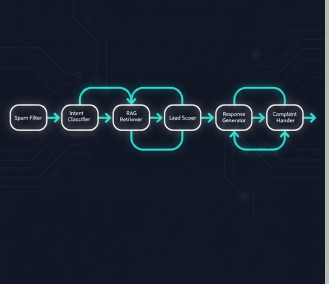
When a message comes in, the agent doesn’t just pass it to a language model and hope for the best. There’s a structured pipeline — seven nodes in the LangGraph graph, each with a specific responsibility.
The first stop is the Spam Filter. This node catches irrelevant or malicious inputs before they waste any compute. If the message doesn’t look like a genuine business inquiry, it’s flagged and dropped. Clean inputs move to the Intent Classifier, which categorises the message into one of nine buckets — product inquiry, pricing, certifications, complaints, general FAQ, lead qualification, and a few others. That classification determines which path through the graph the conversation takes.
For most business inquiries, the message goes through the RAG Retriever next. This is where the knowledge base earns its place. Instead of the LLM hallucinating answers about certifications or payment terms, it retrieves the actual relevant chunks from the documents and grounds the response in real information. A buyer asking “do you have Oeko-Tex certification?” gets an answer pulled from the actual certifications document, not a confident-sounding guess.
The Lead Qualifier and Lead Scorer nodes are where the business logic lives. The scorer assigns points based on specific signals in the conversation: order quantity above 5,000 metres gets 30 points; a premium market like the EU, UK, US, or Japan adds 20 points; mentioning certifications required adds 15; a specific timeline adds another 15; and budget information contributes 20 more. A buyer who ticks all those boxes hits 100. A vague message with no specifics scores near zero.
Scores above 80 are HOT leads. The agent automatically sends the Calendly booking link in the response. No human needed, no delay. Scores between 50 and 79 are WARM — the agent sends the product catalogue and keeps the conversation going. Below 50 is COLD — the agent provides helpful information and moves on without wasting sales team time.
Complaints route through a separate dedicated node that escalates appropriately. The Response Generator pulls everything together — retrieved knowledge, lead score, conversation context — and produces a reply that sounds human and is specific to what the buyer actually asked.
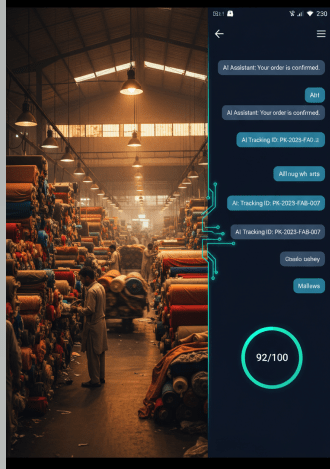
The whole system runs behind a FastAPI backend with rate limiting, input validation, and a /leads endpoint that returns the live lead database. The Streamlit frontend gives a visual WhatsApp simulation on the left and a live lead dashboard with score meter on the right. Both have to run simultaneously — the frontend calls the API, not the agent directly.
What I Actually Learned Building This
The biggest thing wasn’t technical. It was learning to think about the business problem before touching code. The lead scoring logic didn’t come from an AI paper — it came from thinking about what a textile exporter’s sales team actually cares about when they look at an inquiry. Order size, market, urgency, budget. Those weights in the scoring model are business decisions dressed as code.
On the technical side, LangGraph is genuinely powerful once you get past the initial learning curve of graph-based state machines. The explicit node structure forces you to think about separation of concerns in a way that vague LLM chains don’t. Each node does exactly one thing. That makes the whole system much easier to debug, extend, and explain to someone who isn’t an engineer.
RAG pipelines are deceptively tricky. The concept is simple — retrieve relevant documents, ground your LLM response in them. But the quality of retrieval depends heavily on how you chunk, how you embed, and what your documents actually look like. Spending time on the knowledge base and chunking strategy paid off more than any prompt engineering later.
I also learned that working within constraints — no GPU, free API tier, Windows environment — isn’t a disadvantage when you’re building to demonstrate architectural thinking. The constraints forced cleaner decisions. In-memory ChromaDB is simpler to reason about than a hosted vector DB for a prototype. Groq’s free tier made iteration fast. The stack I ended up with is one I can explain clearly and defend every choice.
Where This Goes Next
TextileBot is on GitHub as textilebot-whatsapp-agent. The full stack — LangGraph agent, RAG pipeline, FastAPI backend, Streamlit frontend — is there with documentation. There’s a presentation deck too if you want the business-layer overview rather than the code.
What interests me now is taking this architecture into other B2B export industries in Pakistan. The textile industry is one of many where sales teams are overwhelmed by unqualified inbound and the qualification process is entirely manual. The underlying pattern — classify, retrieve, score, respond — applies broadly. Surgical instruments. Sporting goods. Leather exports.
If you’re building something in this space, or you’re a business owner wondering whether something like this could work for your sales process, feel free to reach out. I’m always up for a conversation about what’s actually possible versus what’s just demo-ready.
And if you’re a fellow engineer — I hope the honest account of the chunking headache and the LangGraph state bug saved you a few hours somewhere down the line.





Leave a comment