Hey there, fellow tech enthusiasts and curious minds!
Ever wondered what goes on behind the scenes when companies process mountains of data? Think about your online orders, customer details, or even those daily sales reports. It’s not magic – it’s often a sophisticated data pipeline!
I recently dived headfirst into the world of data engineering and built my very own Local Batch Data Processing & Orchestration Simulator. Sounds fancy, right? But at its core, it’s about taking messy, raw data, cleaning it up, transforming it, and getting it ready for action – all on my own machine, just like big cloud platforms do!
So, What Even IS a Data Pipeline? (The Simple Version)
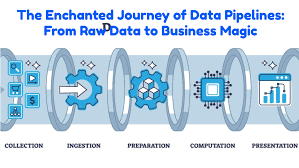
Imagine data is like a river. It flows in, sometimes a bit murky or with debris. A data pipeline is like a series of purification and processing plants along that river.
- Extraction (The Dam): First, you collect the water (raw data) from its source.
- Transformation (The Filter & Treatment Plant): Then, you clean it, filter out impurities, and reshape it into something useful.
- Loading (The Reservoir): Finally, you store the clean, usable water in a reservoir, ready to be used for drinking, irrigation, or generating power (insights, reports, AI models!).
This whole process is often called ETL (Extract, Transform, Load) or ELT (Extract, Load, Transform) – and it’s the backbone of data-driven decisions.
My Project: Building a Mini-Data Factory!
My “Local Batch Data Processing & Orchestration Simulator” project allowed me to experience this firsthand. Here’s how I tackled it:
1. Setting Up My Workspace: The Groundwork
Before building anything, I needed a clean workshop. I organized my project with clear folders:
raw_data: Where the unprocessed, fresh-from-the-source data lives (think CSV files of customer info and orders).processed_data: A temporary holding area for data as it gets cleaned and transformed.logs: My project’s diary, recording every step and any hiccups along the way.scripts: This is where all the “worker” Python programs reside, each designed to do a specific job.- And crucial to keeping things tidy: a Python Virtual Environment (
venv). This little gem creates an isolated space for my project’s Python packages, preventing conflicts with other projects. It’s like having a dedicated toolbox for this specific job!
2. The Brains of the Operation: pipeline_orchestrator.py
This was the heart of my simulator! Just like Azure Data Factory or Databricks Workflows, my pipeline_orchestrator.py script was responsible for:
- Kicking off each data processing step in the correct order.
- Ensuring one step finished successfully before the next one started.
- Logging everything, so I could see what happened, when, and if there were any issues.
3. The Grunt Work: My Python Scripts
Inside my scripts folder, I had specialized Python programs, each focusing on one part of the ETL process:
extract_orders.py: This script was my data collector. It grabbed raw order data from multiple CSV files, combined them, and dropped them into theprocessed_dataarea.transform_orders.py: Here’s where the magic of cleaning happened! This script took the extracted orders, removed any invalid entries (like orders with zero quantity or price), calculated new useful fields (like total amount and order month), and then saved the neat data.enrich_customers.py: Data isn’t just about numbers; it’s about context! This script took raw customer data, removed any duplicates, and even added extra information like the customer’s country, making the data richer and more insightful.load_to_datamart.py: The grand finale! This script took all the beautifully transformed and enriched data and loaded it into a central “data mart.” For this project, my data mart was a simple SQLite database (data_mart.db). I organized the data into two tables:dim_customers(for customer dimensions) andfact_orders(for sales facts). This structure is typical in data warehousing, making it easy to analyze sales by customer, region, and more.
4. Seeing Is Believing: Peeking into the Data Mart!
After running my orchestrator, the most satisfying part was opening data_mart.db using DB Browser for SQLite. This tool allowed me to visually inspect the dim_customers and fact_orders tables and confirm that my pipeline had successfully cleaned, transformed, and loaded the data exactly as planned. It’s like opening the tap and seeing perfectly clear water!
Why This Project Matters (and Why You Should Try It Too!)
Building this local simulator wasn’t just a coding exercise; it was a deep dive into core data engineering concepts:
- Modular Design: Breaking down complex tasks into smaller, manageable, and reusable scripts.
- Pipeline Orchestration: Understanding how to sequence jobs and manage dependencies – a critical skill that directly translates to using tools like Azure Data Factory, AWS Glue, or Databricks Workflows in the cloud.
- Data Transformation: Getting hands-on with data cleaning, validation, and enrichment using powerful libraries like Pandas.
- Robustness: Implementing basic logging and error handling to create a more resilient pipeline.
- Cloud Parallels: Drawing direct connections between local implementations and their counterparts in real-world cloud data platforms and data warehouses.
This project significantly strengthened my foundation in batch data processing and orchestration. It’s a testament to how simulating complex systems locally can provide invaluable practical experience.
You can find my code here in this Github link
https://github.com/Junaid1991-maker/local_etl_orchestrator
Ready to Build Your Own?
If you’re looking to solidify your data engineering skills, I highly recommend building a similar project. It demystifies the “black box” of data pipelines and gives you a tangible portfolio piece.
Feel free to reach out if you have questions or want to discuss the details!





Leave a comment